The Caption for the login does no work no matter what
Answered
Hello,
I have been trying to access my account for a while now, even reset my password , but now matter what Caption I put, I cannot login in order to troubleshoot my issue. Can somone please help me here :
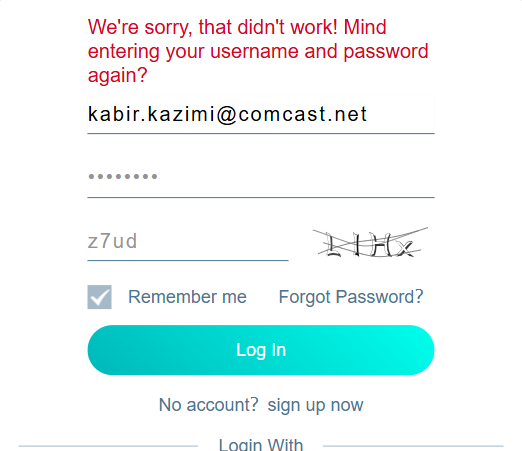
0
-

Hello, thank you for your feedback. There may be an issue with not being able to enter or use the login verification code, which may be related to network connection, verification code verification process, or application version. In order to better assist you in solving the problem, please try the following steps first:
1. Ensure network stability : Please confirm that your mobile network connection is normal, and it is recommended to switch to a stable Wi-Fi environment.
2. Update the app : Please make sure your blurams app is up to date and you can check for updates in the App Store or Google Play.
3. Clear cache or reinstall app : Try clearing the app cache or reinstalling the app after uninstalling it, and then log in again.
4. Try on different devices : If convenient, you can try logging in with another phone or tablet to see if the problem still exists.
5. Confirm that the verification code area is not blocked or entered incorrectly : Please make sure that the verification code text box is not blocked or covered by other applications, and pay attention to the accuracy of capitalization and characters when entering.
If the above steps do not solve the problem, please provide the following information:
- The device model and operating system version you are using
The specific time point where the problem of verification code not working occurred
- Any screenshots of pop-up prompts or error messages encountered (if any)
This way I can provide you with more targeted help. You can also consider contacting the official customer service of blurams for remote assistance. Thank you very much for your patience and cooperation!0
Please sign in to leave a comment.
Comments
1 comment